5' Foot X 1.25" OD 16 AWG Galvanized Antenna Mast Pole | EZ 5-16
EZ 5-16 5 Foot Galvanized Antenna Mast 5 Foot by 1.25" OD 16 Awg
(60") by 1.25" OD 16 AWG Galvanized Antenna Mast (Mount Not Included). Sturdy One Piece that Fits a Variety of Mounts for Flexibility In Antenna Mounting and Height Clearance.
There's a Big difference between 18 AWG and 16 AWG when it comes to Antenna Masts. This 16 AWG Mast is thicker, hardier, stronger and weighs more with heavier Pre-Galvanization. When considering the longevity of your HDTV Off-Air TV Antenna, there's no substitute for the strength of this mast in effectively transfering the Wind Load from the Antenna to the Mount in preventing the mast from Folding over. The 18 AWG painted masts just don't hold up. Be Sure and afford yourself 2 feet minimum, up to 1/4 of the overall mast length between the two wall mounts you would utilize in your TV antenna Installation. The Torque applied from wind load through cantilever to these mounts can be significant. This is one reason we no longer offer the 18 AWG masts such as the Channel Master CM-1805 or Cm-1810.
 2 inch W type Antenna Mast Wall Mount Bracket 3S-WM2
- $10.95
2 inch W type Antenna Mast Wall Mount Bracket 3S-WM2
- $10.95
3S-WM2 "W" Type Heavy Duty Antenna Mast 2 inch Wall Mount Bracket

Made in the USA ( Holds Masts from 1 to 2.00" in Diameter ) is designed to provide supplemental Wall Mount Support for ROHN H50, H40, H30, H20 and Channel Master 1620, 1630, 1640, 1650, 1820, 1830, 1840, 1850 Telescopic Push Up Antenna Masts or ANY TV Antenna Mast like the CM-1607, CM-1610, CM-1805, CM-1810, EZ 5-16, EZ 5-16S, 3S-5999 and 3S-5994 from 1 to 2.00 Inches in Diameter (Mast not included). Set of (2) comes with Installation Hardware. Guy Wire Support for Mast Sections 10 Feet and greater above this mount will still be required...
Read More
3 inch wall mount bracket for Telescopic TV Antenna Mast
- $9.95
SKY 32811 Telescopic TV Antenna Mast Heavy Duty 3" Wall Mount Bracket
is designed to provide supplemental Wall Mount Support with 3 inch standoff for ROHN H50, H40, H30, H20 and Channel Master 1620, 1630, 1640, 1650, 1820, 1830, 1840, 1850 Telescopic Push Up Antenna Masts or ANY TV Antenna Mast from 1 to 2.5 Inches in Diameter (Mast not included). Set of (2) comes with Installation Hardware and Anti-Twist Feature. Guy Wire Support for Mast Sections above this mount will still be required...
4 inch Heavy Duty Antenna Mast Wall Mount Bracket
- $9.95
SKY 32812 Heavy Duty Antenna Mast 4 inch Wall Mount Bracket
is designed to provide supplemental Wall Mount Support for ROHN H50, H40, H30, H20 and Channel Master 1620, 1630, 1640, 1650, 1820, 1830, 1840, 1850 Telescopic Push Up Antenna Masts or ANY TV Antenna Mast like the CM-1607, CM-1610, CM-1805, CM-1810, EZ 5-16, EZ 5-16S, 3S-5999 and 3S-5994 from 1 to 2.25 Inches in Diameter (Mast not included). Set of (2) comes with Installation Hardware. Guy Wire Support for Mast Sections 10 Feet and greater above this mount will still be required...
 6 inch TV Antenna Wall Mount Y Bracket 3S-WM6
- $10.82
6 inch TV Antenna Wall Mount Y Bracket 3S-WM6
- $10.82
3S-WM6 6" Stand-off, Deluxe "Y" TV Antenna Mast Wall Mount
 Made in the USA! ( Holds masts from 1" to 1.75" in Diameter )
For Mounting of CM-1607, CM-1610, CM-1805, CM-1810, EZ 5-16, EZ 5-16S and 3S-5994 HDTV Antenna Masts from 1 inch to 1.75 inches in Diameter and up to 10 feet in Height, Standoff from Wall by 6 inches (Mast Not Included)...
Read More
8 inch TV Antenna Wall Mount Y Bracket 3S-WM8
- $13.90
3S-WM8 8" Stand-off, Deluxe "Y" TV Antenna Mast Wall Mount
Made in the USA! ( Holds Mast from 1" to 1.75" in Diameter )
For Mounting of CM-1607, CM-1610, CM-1805, CM-1810, EZ 5-16, EZ 5-16S and 3S-5994 HDTV Antenna Masts from 1 inch to 1.75 inches in Diameter and up to 10 feet in Height, Standoff from Wall by 8 inches (Mast Not Included)...
 12 inch Deluxe Y Wall Mount Antenna Bracket 3S-WM12
- $19.95
12 inch Deluxe Y Wall Mount Antenna Bracket 3S-WM12
- $19.95
3S-WM12 12" Stand-off, Deluxe "Y" Wall Mount with 3rd Leg
Made in the USA!
For Mounting of CM-1607, CM-1610, CM-1805, CM-1810, EZ 5-16, EZ 5-16S and 3S-5994 HDTV Antenna Masts from 1 inch to 1.75 inches in Diameter and up to 10 feet in Height, Standoff from Wall by 12 inches (Mast Not Included)...
18 inch Deluxe Y Wall Mount Antenna Bracket 3S-WM18
- $26.95
3S-WM18 18" Stand-off, Deluxe "Y" Wall Mount with 3rd Leg
Made in the USA!
For Mounting of CM-1607, CM-1610, CM-1805, CM-1810, EZ 5-16, EZ 5-16S and 3S-5994 HDTV Antenna Masts from 1 inch to 1.75 inches in Diameter and up to 10 feet in Height, Standoff from Wall by 18 inches (Mast Not Included)...
24 inch Deluxe Y Wall Mount Antenna Bracket EZ30-24
- $34.95
3S-WM-24 24" Stand-off, Deluxe "Y" Wall Mount with 3rd Leg
Made in the USA!
For Mounting of CM-1607, CM-1610, CM-1805, CM-1810, EZ 5-16, EZ 5-16S and 3S-5994 HDTV Antenna Masts from 1 inch to 1.75 inches in Diameter and up to 10 feet in Height, Standoff from Wall by 24 inches (Mast Not Included)...
Selecting Antenna Mast Pipe?
Selecting the proper antenna mast pipe is crucial. Depending on the size of your antenna, it's EPA, weight and height all play a factor in selecting a supportive pole. When planning, it's best to have all the information you can get like outside diameter of your attaching method, the clearance of gutters, siding or other obstacles in the path of your erecting a mast or tower.
Here you will find standard straight pipe in 5' foot and 10' foot lengths. You can also find those same pipes with a special end called a swag. A swaged ended pipe allows you to attach several lengths of pipe together.
| Swaged End | Straight End |
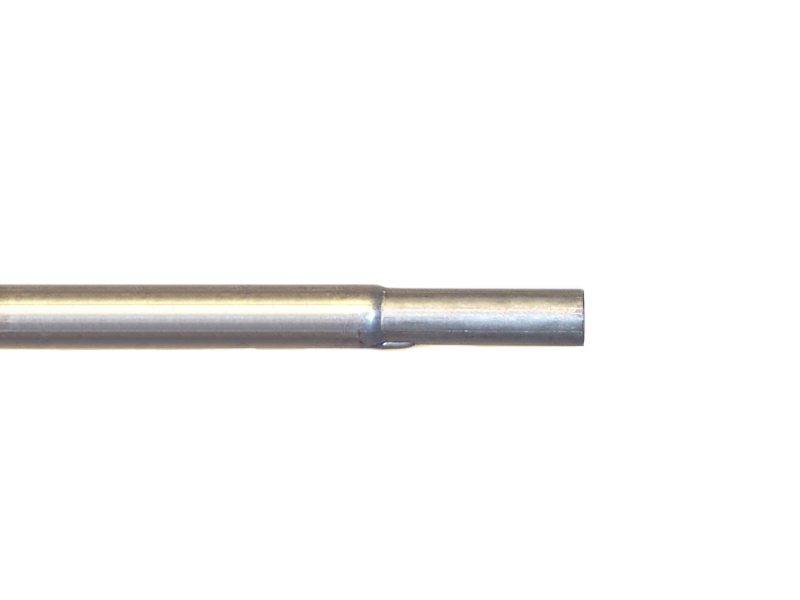 | 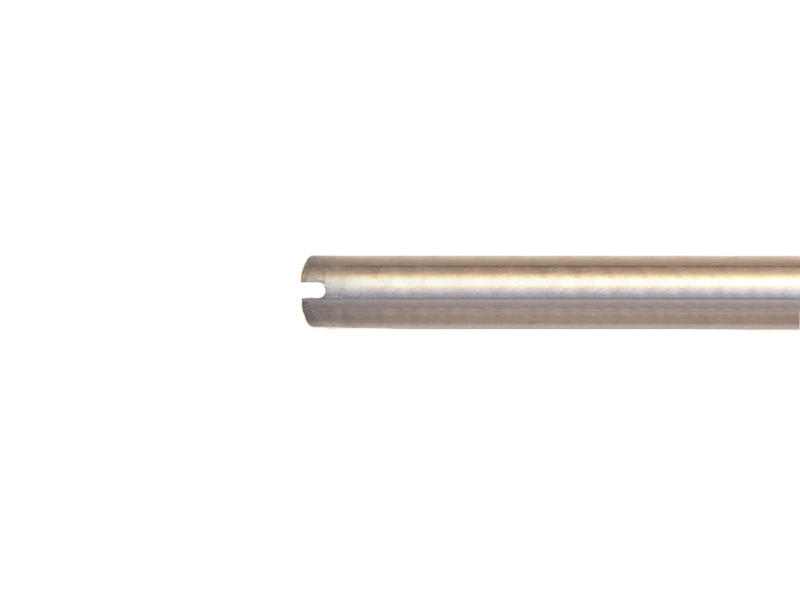 |
When selecting a pipe you will need to know the length, OD (outside diameter), the AWG 16 or 18 (the smaller the number the thicker the steel) and weather you'll need any swaged ended pieces. You'll then need to select the proper mounting such as wall, roof or maybe a tripod.

Price: $16.30
Availability: Usually ships in 24 Hrs
EZ 5-16S 5 Foot 16 AWG Swaged Antenna Mast Section 
|
|
Price: $27.00
Availability: Usually ships in 24 Hrs
EZ 8-16 -8 Foot Galvanized
|
|
Price: $27.95
Availability: Usually ships in 24 Hrs
EZ 8-16S -8 Foot 16 AWG Swaged Antenna Mast Pre- Galvanized
|
|
Price: $27.95
Availability: Usually ships in 24 Hrs
EZ 10-16 10 Foot Galvanized
|
|
Price: $28.30
Availability: Usually ships in 24 Hrs
EZ 10-16s 10 Foot Galvanized
|

Price: $36.88
Availability: Usually ships in 24 Hrs
EZ 48-3A 3 Foot Roof Mount Tripod for Antenna MastHolds masts up to 1.75" diameter. Made of 1.25" OD- 18 gauge galvanized tubing. Spread 32" Mast supported by 6 bolts; plus supporting cup. Mast not included. Made in America. Read More.
|

Price: $31.50
Availability: Usually ships in 24 Hrs
EZ 22-3A 3 Foot Roof Mount Tripod for Antenna Mast
Holds masts up to 1.66" diameter. Made of 1"OD- 18 gauge galvanized tubing. Spread 32" Mast supported by 6 bolts; plus supporting cup. Mast not included. Made in America. Read More.
|

Price: $54.00
Availability: Usually ships in 24 Hrs
3S- 6031 3 Foot Roof Mount Tripod for Antenna Mast
|

Price: $28.60
Availability: Usually ships in 24 Hrs
EZ 22-3 3 Foot Roof Mount Tripod for Antenna MastHolds masts up to 1.5" diameter. Made of 1"OD- 18 gauge galvanized tubing. Spread 32" Mast supported by 2 bolts. Mast not included. Made in America. Read More.
|

Price: $49.00
Availability: Usually ships in 24 Hrs
VMP TR-36 36 Inch Roof Mount Tripod for Antenna Mast
|